Reactive Spring Flux data from a Pi
Trisha Gee (Coder, blogger, speaker, Developer Advocate at JetBrains, @trisha_gee), which I interviewed for “Chapter 4: Choosing an IDE”, and Josh Long (Spring Developer Advocate at Pivotal, @starbuxman) worked together on a blog series in which they showed the power of reactive data produced by a Spring application. Instead of repeating a REST call each time you want to get data from the server, you do one call which returns a continuous stream in which new data is pushed based on an interval.
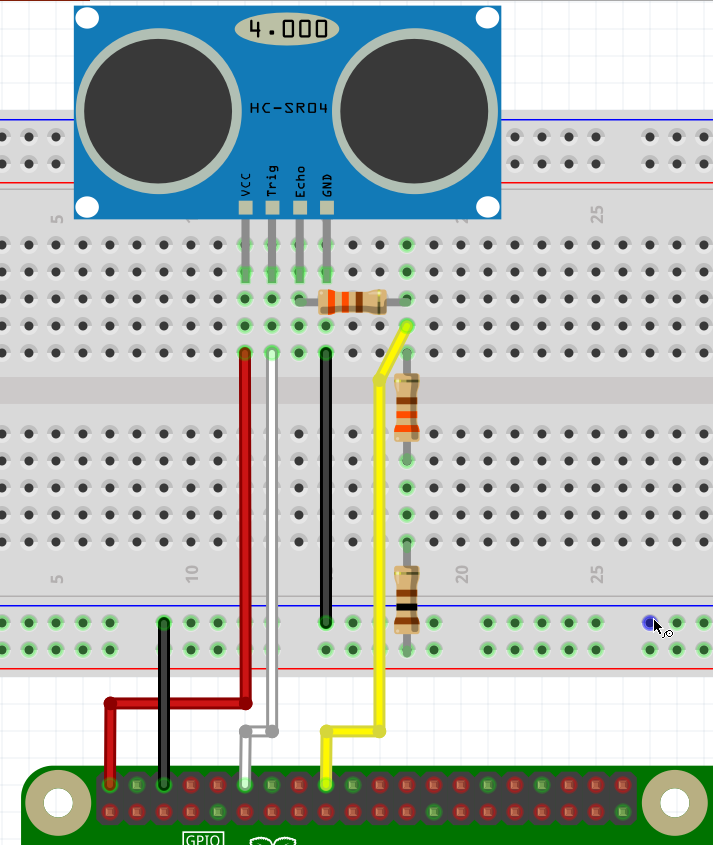
Their example uses a Kotlin service to send stock values every second. I was wondering if this could be achieved on the Pi. And of course! This example is based on the one from “Chapter 9: Pi4J” with the distance sensor. It uses the same wiring with some rework of the code integrated in a Spring application.
Wiring
Code
The sources can be found as an example project within all the sources from the book on GitHub. The most important part is the service generation the distance measurement Flux:
    private static final Pin PIN_TRIGGER = RaspiPin.GPIO_01;    // BCM 18
    private static final Pin PIN_ECHO = RaspiPin.GPIO_05;       // BCM 24

    private final GpioPinDigitalOutput trigger;
    private final GpioPinDigitalInput echo;

    public DistanceService() {
        // Initialize the GPIO controller
        GpioController gpio = GpioFactory.getInstance();

        // Initialize the pins
        this.trigger = gpio.provisionDigitalOutputPin(PIN_TRIGGER, "Trigger", PinState.LOW);
        this.echo = gpio.provisionDigitalInputPin(PIN_ECHO, "Echo", PinPullResistance.PULL_UP);
    }

    public Flux getDistances() {
        return Flux.fromStream(Stream.generate(() -> this.getDistanceMeasurement()))
                .delayElements(Duration.ofSeconds(1));
    }

    private DistanceMeasurement getDistanceMeasurement() {
        try {
            // Set trigger high for 0.01ms
            this.trigger.pulse(10, PinState.HIGH, true, TimeUnit.NANOSECONDS);

            // Start the measurement
            while (this.echo.isLow()) {
                // Wait until the echo pin is high,
                // indicating the ultrasound was sent
            }
            long start = System.nanoTime();

            // Wait till measurement is finished
            while (this.echo.isHigh()) {
                // Wait until the echo pin is low,
                // indicating the ultrasound was received back
            }
            long end = System.nanoTime();

            // Output the distance
            float measuredSeconds = (end - start) / 1000000000F;
            int distance = Math.round(measuredSeconds * 34300 / 2);

            logger.info("Measured distance is: {}  for {}s", distance, measuredSeconds);

            return new DistanceMeasurement(distance, measuredSeconds);
        } catch (Exception ex) {
            logger.error("Error: {}", ex.getMessage());
        }

        return null;
    }
Result
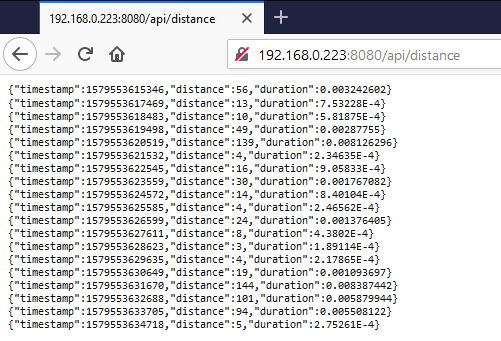
After building the jar and running it on the Pi, the data is streamed to the browser:
Conclusion
As always with Java, the required code is only a few lines, but you have to find which lines ;-)
This reactive API is only the starting point and only becomes valuable with some clients consuming and using the generated data, but that’s a fun project for you…