Closing the Visual Gap Between the Official Lottie Webplayer and Lottie4J
A Lottie library is only as good as its output looks. If an animation renders differently in Lottie4J than it does in the official web player, that’s a bug, even when no exception is thrown and the code looks correct.
Within the fxfileviewer, there is an app to visually compare the result of the JavaFX player and a webview using the official JavaScript player. Problem is that I was using the JavaFX Web component for this and this doesn’t fully support the latest/best version of this player. Based on this app for manual checks, I also created a unit test which is able to loop over a set of files and compare the differences to make sure changes in the code don’t break the existing renderer. But I kept struggling with the same test file interactive_mood_selector_ui.json
which didn’t render correctly, both in the JavaFX view and my web-based view to compare it with.
Over the last weeks the focus has been exactly there: making the JavaFX output match the reference renderer, pixel for pixel (if possible).
Improved Comparison Workflow
The biggest change is not a rendering fix but the way rendering is now verified. The test suite renders the same animation two ways and compares them frame by frame:
- The reference side runs the official web player inside a headless Chrome instance. This reference renderer was migrated from
lottie-webtodotlottie-wc(thorvg), the engine LottieFiles is standardizing on. The reference images are not generated during the unit test, but as a one-time job on my PC and committed in the test/resources . - The Lottie4J side renders the same file through the JavaFX player.
Now each frame is diffed, instead of every 5 frames before, and measured against a tolerance “floor”. When Lottie4J drifts from the reference, a test fails and points at the exact frame. This runs with headless JavaFX on GitHub Actions as described in the post Testing Lottie4J JavaFX Animations in GitHub Actions Without a Display: JavaFX 26 Headless to the Rescue
. That turned “this animation looks a bit off” into a concrete, reproducible signal. The goal is to get each file to 99.5% similarity
, but that value can be overruled per file. As you can see in the code
, the “worst” file is now at 95.2%, and yes, it’s still that difficult interactive_mood_selector_ui.json.
     private static final Map<String, Double> PER_FILE_FLOOR_OVERRIDE = Map.ofEntries(
            Map.entry("json/interactive_mood_selector_ui.json", 95.2),
            Map.entry("json/animated_background_patterns.json", 99.2),
            Map.entry("json/angry_bird.json", 98.2),
            Map.entry("json/face-peeking.json", 98.5),
            Map.entry("json/java_duke_flip.json", 95.7),
            Map.entry("json/java_duke_slidein.json", 98.8),
            Map.entry("json/lottie_lego.json", 98.0),
            Map.entry("json/sandy_loading.json", 99.3),
            Map.entry("dot/demo-1.lottie", 99.3)
    );
New real-world test animations, like pi4j.json, foojay-reporter.json and foojay-duke.json, got added so the harness measures against the files I’m actually using.
Rendering Fixes
With the harness in place, the diffs made it obvious where JavaFX and the web player disagreed. The fixes can be grouped into a few areas:
- Easing: The
lottie-webBezierEaserwas ported byte-for-byte into a sharedcore.helper.BezierEasing, and the arc renderer now clamps the easing solver to prevent bezier divergence, with a bisection fallback for flat-point curves. A full-circle trim path that used to flicker (floating-point precision loss when wrapping the offset) is fixed. - Mattes: Pixel-level matte composition was extracted into a testable static helper, and the inverted-alpha matte type (
tt: 2→INVERTED_ALPHA) is now handled correctly. - Gradients: Alpha and colour stops are merged at the union of their offsets, and linear-RGB gradient stops are densified so colour transitions match the reference.
- Blur and blend modes: Gaussian blur was improved, the blend-mode offscreen buffer size is rounded up (ceil) so nothing gets clipped, and the effects renderer was reworked.
- Text: Text colour handling and text animation are now correct.
Individually these are small, but together they close a lot of the visible distance between Lottie4J and the official player.
Built with Systematic AI Coding
All of this was implemented with Theia IDE using the Claude API. I learned about Theia IDE during an Eclipse Foundation workshop in Brussels. I wrote about it on Foojay.io: Systematic AI coding, my takeaways .
The takeaways from that article map almost one-to-one onto this batch of work:
- Design before prompting, then review the output: The comparison harness is what makes review possible. And the
@Architectwithin Theia IDE was able to run the tests file by file, find differences, write plans, and evaluate the results. - A tight feedback loop beats one big prompt: Failing frame → targeted fix → re-run → next frame. The commit history reads as exactly that rhythm .
- Keep sessions scoped and don’t fear a restart: The
@Architectwrites the plan. And then you start a new session and ask the@Coderagent to execute it. Each rendering area (mattes, gradients, blur, text) was tackled as its own well-bounded task rather than one ever-lasting conversation. - Let the tools review too: A round of code improvements came straight out of SonarQube findings.
I committed all the tasks written by the @Architect into the repository
so they are available as “history of the project”. The most important take-away here isn’t that AI wrote the code, but the disciplined process with clear tasks and small iterations, each in a new session.
The Result
Where are we now? Check the images below.
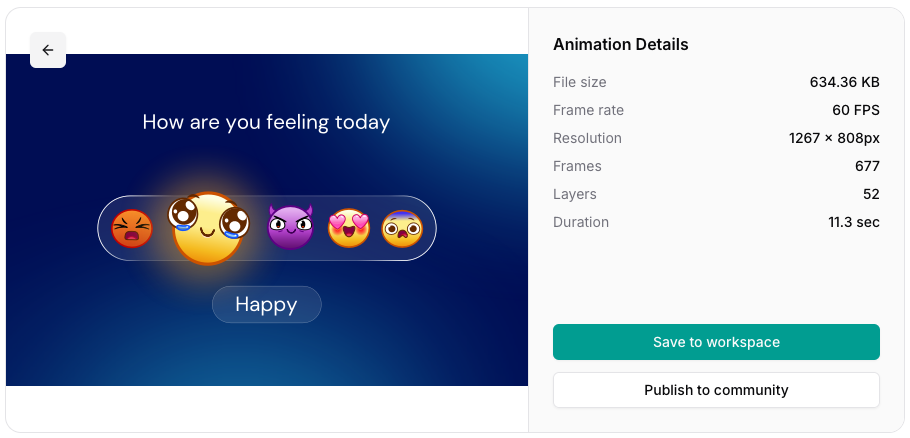
- The first screenshot is the test file in the Preview player on the Lottie website . As you can see a lot of gradients are used in the background and around the emojis. Those are the parts I was struggling with…
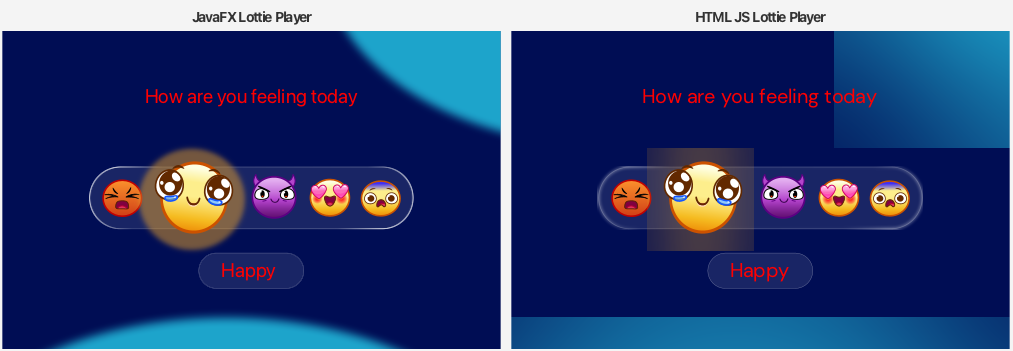
- The second screenshot is the “before”. Both the JavaFX and the webview version have a lot of differences. This also means I was using the wrong comparison source images to validate the JavaFX result!
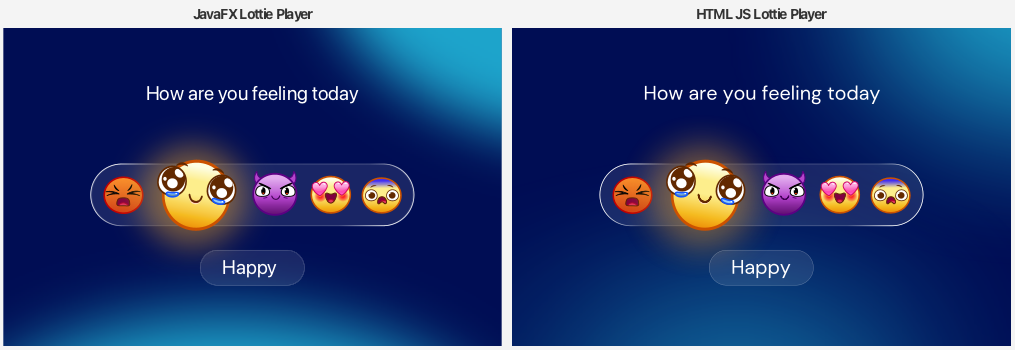
- The third screenshot is the “after” which shows a lot of improvements. First and most important, the comparison images from the webview are now pixel-perfect as they get rendered based on the latest version of the official Lottie web player. And you can also see that the JavaFX result is now a really close match! The background gradients are not pixel-perfect yet, and I still see small differences in the text, which confirms the 95% similarity score. But overall, I’m very happy with the improvements!
The Cost
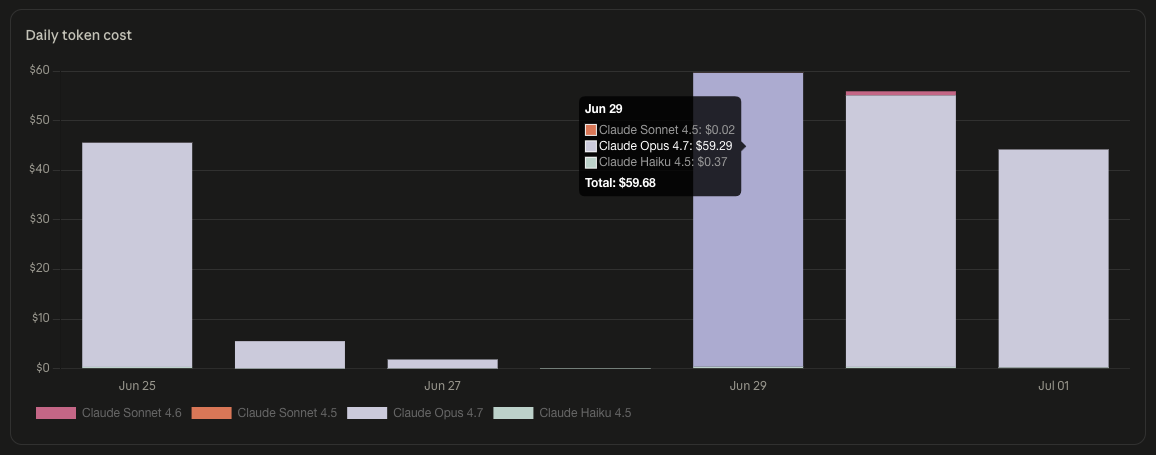
Of course, the AI coding process is not free. Theia IDE luckily is free, but it needs one or more API keys to call AI services. As you can see, I burned a lot of tokens, and budget. But to be honest, I would not have achieved these improvements by myself in such a short time. Actually, I could do my “real work”, and have the tools work in the background!
What’s Next
I’m happy with the results so will release a new version soon. The same approach with @Architect/@Coder will help me to further improve or fix the library when needed. But first I want to know which visual differences remain based on feedback from the users of the Lottie4J library!
As always, contributions, bug reports, and pull requests are welcome at the Lottie4J GitHub repository . If you have an animation that renders differently than you expect, isolate it, and open an issue with the JSON. That’s exactly the kind of case the test flow is built to catch.