Azul Zulu OpenJDK 15 on Raspberry Pi
Originally published on foojay.io, a place for friends of OpenJDK.
For this post I did some experiments with Java 15, reusing the Ubuntu 64bit SD card which was also used for the earlier post “Comparing a REST H2 Spring versus Quarkus application on Raspberry Pi”.
That version of Ubuntu comes with OpenJDK 11 pre-installed.
$ java -version
openjdk version "11.0.8" 2020-07-14
OpenJDK Runtime Environment (build 11.0.8+10-post-Ubuntu-0ubuntu120.04)
OpenJDK 64-Bit Server VM (build 11.0.8+10-post-Ubuntu-0ubuntu120.04, mixed mode)
Installing Azul Zulu 15
The OpenJDK Java 15 version was released on 2020-09-15, check out the Java Version Almanac for more details. Immediately after, Azul also release a new version of their free Zulu Embedded JDK, including a version for ARM 64-bit, so ideal for the latest Raspberry Pi boards!
With the SDKMAN tool you can get a list of available JDKs and switch to Java 15 with a single command sdk install java 15.0.0-zulu.
$ sdk list java

================================================================================
Available Java Versions
================================================================================
 Vendor        | Use | Version      | Dist    | Status     | Identifier
--------------------------------------------------------------------------------
 AdoptOpenJDK  |     | 11.0.8.hs    | adpt    |            | 11.0.8.hs-adpt
               |     | 8.0.252.hs   | adpt    |            | 8.0.252.hs-adpt
 Amazon        |     | 11.0.8       | amzn    |            | 11.0.8-amzn
               |     | 8.0.262      | amzn    |            | 8.0.262-amzn
 Azul Zulu     |     | 15.0.0       | zulu    |            | 15.0.0-zulu
 BellSoft      |     | 14.0.2.fx    | librca  |            | 14.0.2.fx-librca
               |     | 14.0.2       | librca  |            | 14.0.2-librca
               |     | 11.0.8.fx    | librca  |            | 11.0.8.fx-librca
               |     | 11.0.8       | librca  |            | 11.0.8-librca
               |     | 8.0.265      | librca  |            | 8.0.265-librca
 Java.net      |     | 16.ea.15     | open    |            | 16.ea.15-open
               |     | 15           | open    |            | 15-open
================================================================================
Use the Identifier for installation:

    $ sdk install java 11.0.3.hs-adpt
================================================================================

$ sdk install java 15.0.0-zulu

$ java -version
openjdk version "15" 2020-09-15
OpenJDK Runtime Environment Zulu15.27+17-CA (build 15+36)
OpenJDK 64-Bit Server VM Zulu15.27+17-CA (build 15+36, mixed mode)
Comparing startup speeds
To compare the startup speed I reused the Spring and Quarkus applications of the previous articles. I started both of them three times with JDK 11 and 15.
“A Spring REST and H2 database application on the Raspberry Pi”
$ cd JavaOnRaspberryPi/Chapter_10_Spring/java-spring-rest-db/target/
$ java -jar java-spring-rest-db-0.0.1-SNAPSHOT.jar
“Comparing a REST H2 Spring versus Quarkus application on Raspberry Pi”
$ cd JavaQuarkusRestDb/target/
$ java -jar javaquarkusrestdb-1.0-SNAPSHOT-runner.jar
Startup results
No important differences here, the newer JDK doesn’t seem to have any influence here.
| JDK | Run | Spring | Quarkus |
|---|---|---|---|
| OpenJDK 11 | 1 | 37s | 10s |
| 2 | 37s | 9s | |
| 3 | 38s | 10s | |
| Azul Zulu 15 | 1 | 39s | 10s |
| 2 | 36s | 10s | |
| 3 | 37s | 10s |
Thread and memory analysis with VisualVM
Let’s go a step deeper and use VisualVM to inspect the application. I installed this on my Ubuntu PC with sudo apt install visualvm and extended the startup commands on the Raspberry Pi so a connection can be made from another PC.
$ java -Dcom.sun.management.jmxremote \
    -Dcom.sun.management.jmxremote.port=9010 \
    -Dcom.sun.management.jmxremote.local.only=false \
    -Dcom.sun.management.jmxremote.authenticate=false \
    -Dcom.sun.management.jmxremote.ssl=false \
    -jar javaquarkusrestdb-1.0-SNAPSHOT-runner.jar
I waited each time 2 minutes before taking a screenshot.
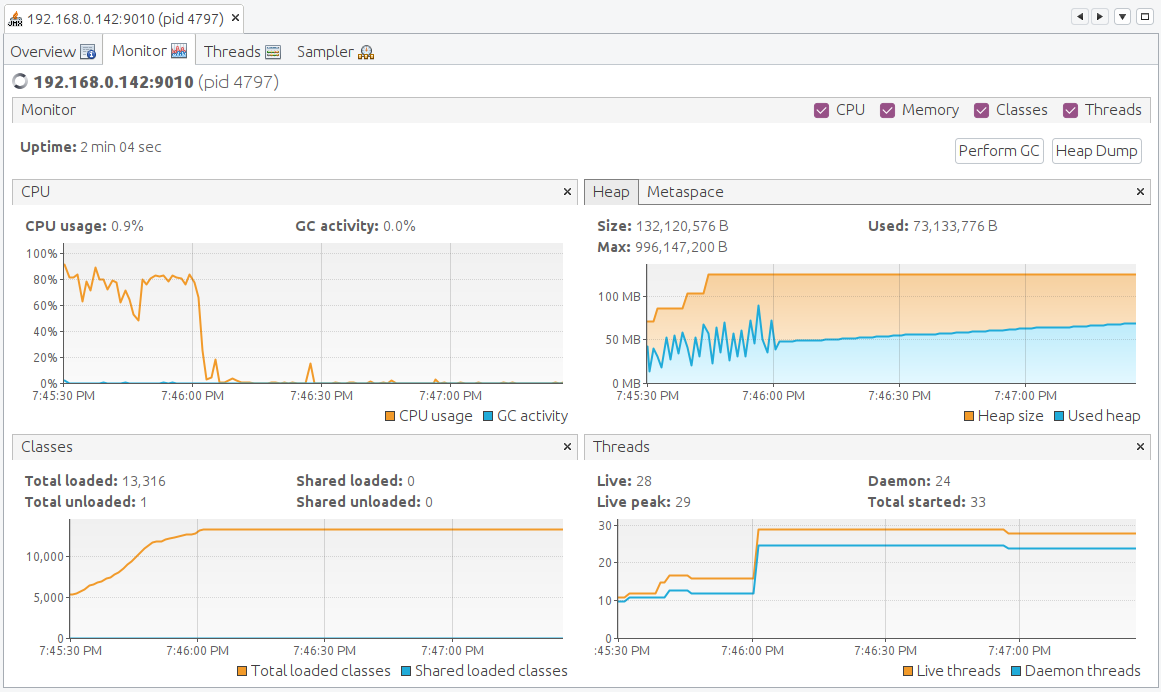
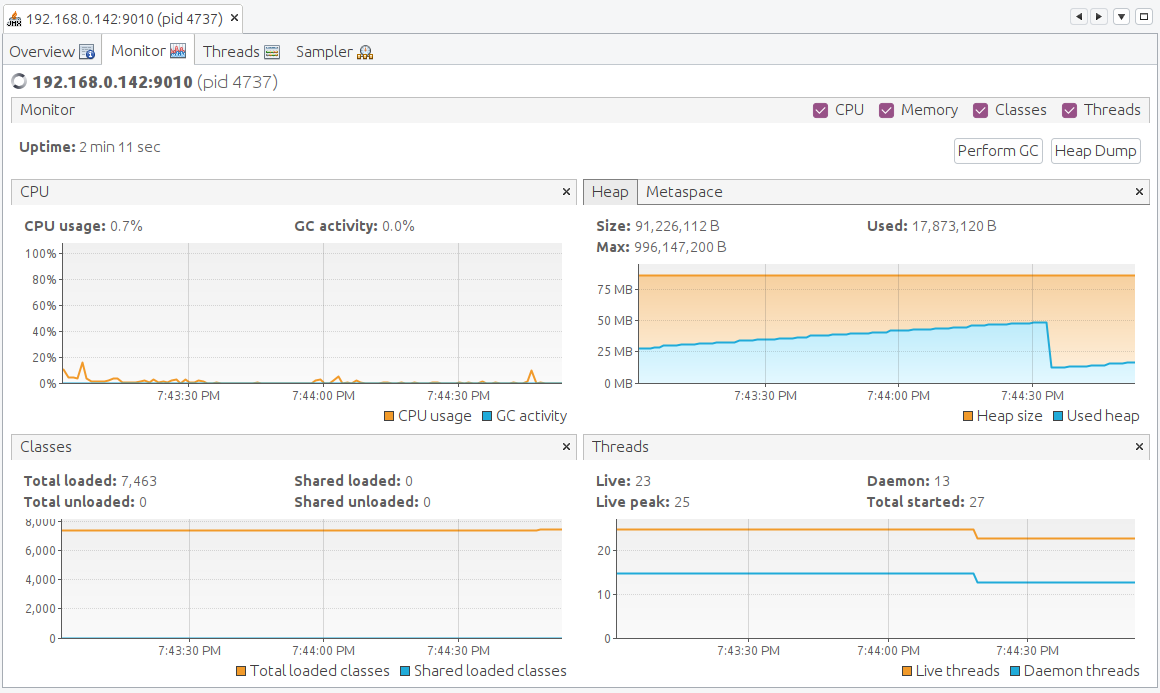
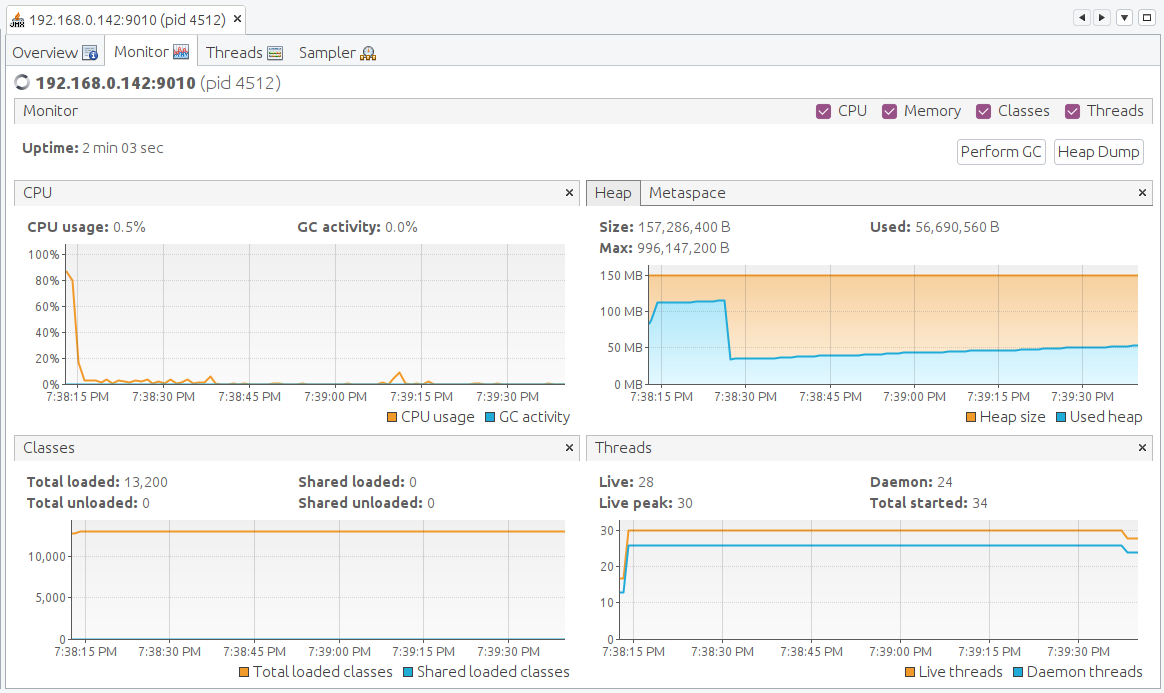
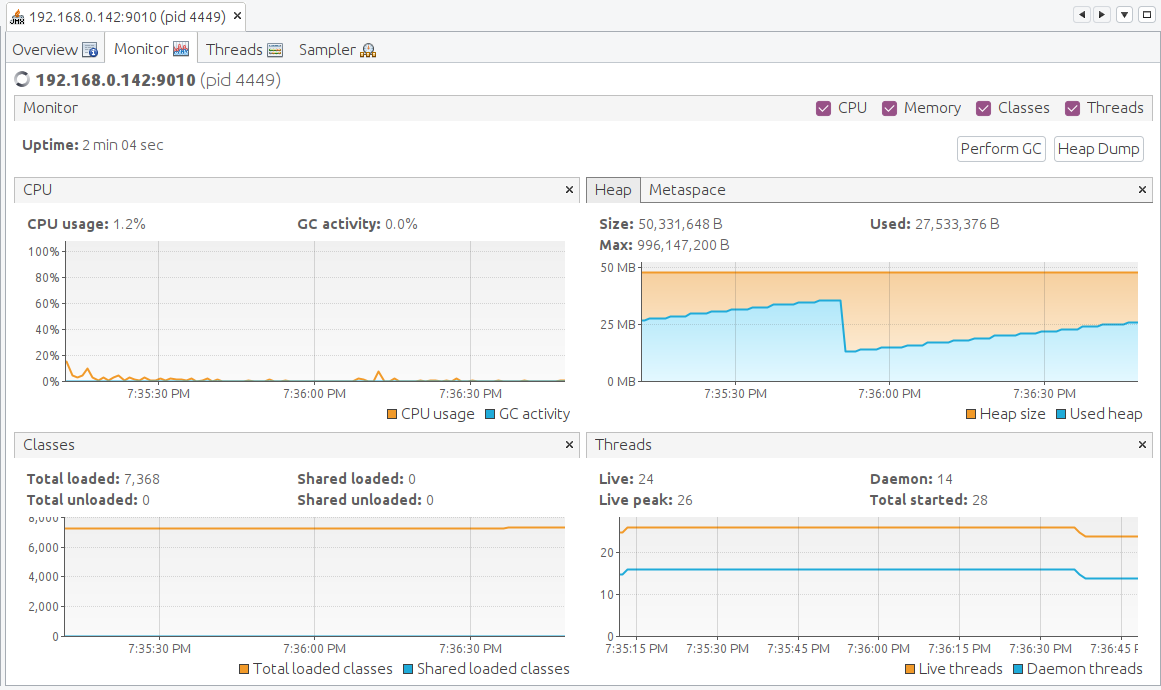
Profiling conclusions
| Framework | JDK | Running CPU | Heap Size | Loaded classes |
|---|---|---|---|---|
| Spring | OpenJDK 11 | < 20% | 132 MB | 13316 |
| Spring | Azul Zulu 15 | < 10% | 157 MB | 13200 |
| Quarkus | OpenJDK 11 | < 10% | 90 MB | 7463 |
| Quarkus | Azul Zulu 15 | < 10% | 50 MB | 7368 |
Conclusions
Do you need to switch from Java 11 to 15? No, not really based on these results. But each new version has bug and security fixes, new features, and generic improvements.
Don’t forget to check the list of highlights for this release which includes a few big development improvements, including text blocks (JEP 378) which will allow you to write cleaner code.