Lottie4J 1.3.0 and 1.4.0: Reading and Writing Real-World Lottie Files
Released yesterday: two new versions of Lottie4J, the Java and JavaFX library to render Lottie animations: 1.3.0 and 1.4.0. Both came out of the same work after a call with Dirk Lemmermann. Dirk is THE JavaFX expert and he creates amazing applications and libraries with his company DLSC Software & Consulting. He showed me AnimatorFX, a new application he is working on to create and playback JavaFX animations. The application is also able to import Lottie4J animations (and other formats), and I stepped in to replace the existing code with my Lottie4J library and did several improvements on both sides for a better integration. Released yesterday: two new versions of Lottie4J, the Java and JavaFX library to render Lottie animations: 1.3.0 and 1.4.0. Both came out of the same work after a call with Dirk Lemmermann. Dirk is THE JavaFX expert and he creates amazing applications and libraries with his company DLSC Software & Consulting. He showed me AnimatorFX, a new application he is working on to create and playback JavaFX animations. The application is also able to import Lottie4J animations (and other formats), and I stepped in to replace the existing code with my Lottie4J library and did several improvements on both sides for a better integration.
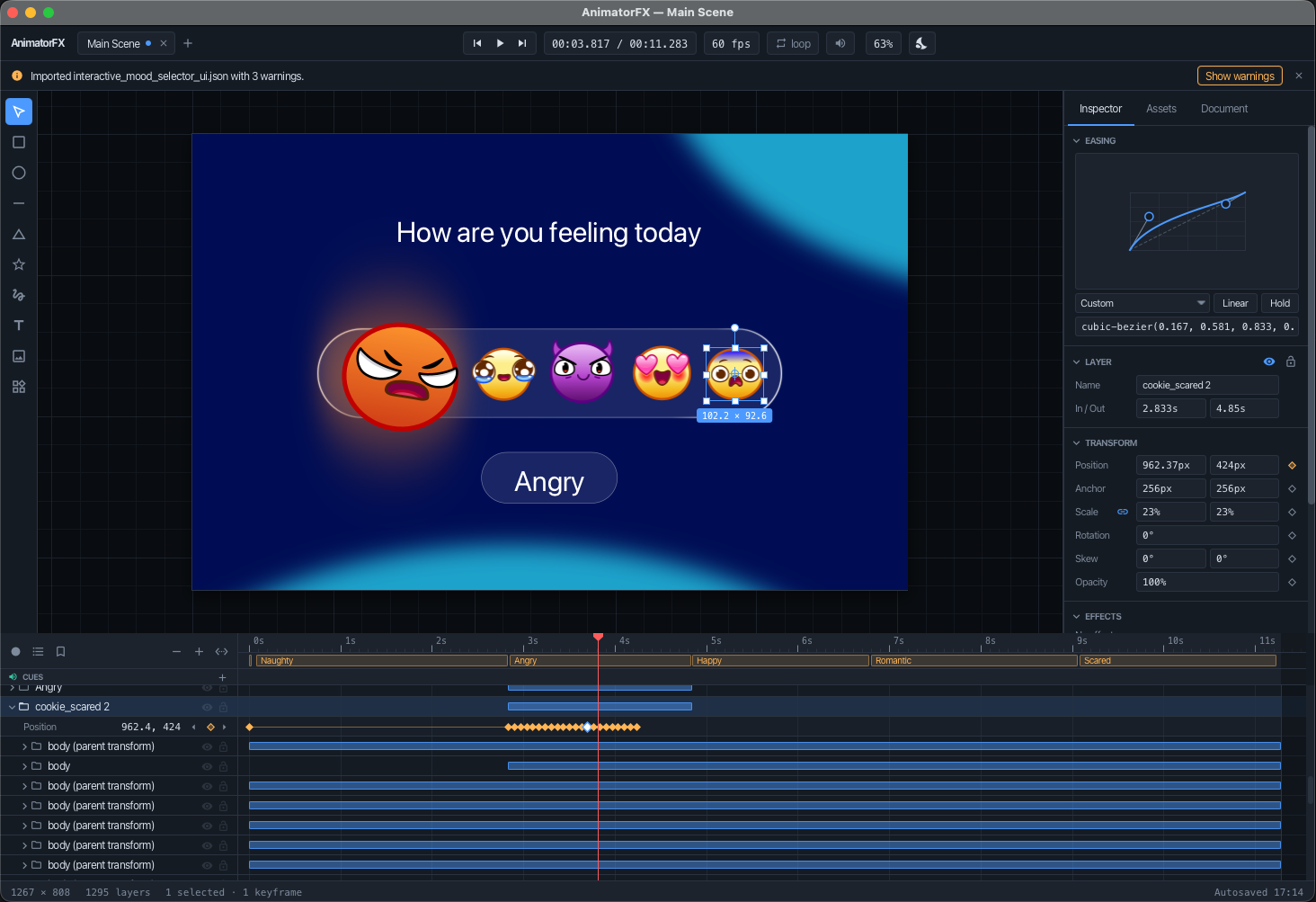
The screenshot in this blog is the AnimatorFX application, showing the timeline of one of the Lottie test json files from the Lottie4J repository. The file was loaded into the application with File > Import > Lottie. The implementation of this importer uses the Lottie4J library.
Why These Releases?
AnimatorFX first used Lottie4J only as a reference renderer in its tests, to compare the output. Then Dirk wanted to use it for parsing the files too. That’s a different story: a parser has to deal with the files you find in the wild, and those don’t always follow the specification. On top of that, the export in AnimatorFX needs a library that can also write Lottie files, and Lottie4J could only save a single layer.
1.3.0: Better Parsing of Real-World Files
This release has the most changes (PR #15).
Files That Were Rejected Before
Some files simply failed to load. These now work:
| Input | After the fix |
|---|---|
Property with an expression ("x": "var …") | loaded; the expression is kept and written back, but never evaluated |
Image asset with an external file ("u": "images/") | available as Asset.directory() |
| Unknown layer type, blend mode, matte mode, line cap, … | logged and read as absent |
| Shape of an unknown type | read as UnknownShape, draws nothing |
Property written as a bare number ("o": 100) | fixed value |
Bugs in Reading Values
- The frame rate, in point and out point are now a
Double. A frame rate of 29.97 was read as 29.FrameTiming.getFrameRatereturns the exact value and the player uses it. - Solid color layers use their
swandshsize. Before, a solid filled three times the composition, whatever its size. - Keyframes in the pre-5 format don’t drop to 0 anymore at the last keyframe.
- A precomposition containing itself caused a
StackOverflowError. Parents running in a circle are handled too. - A track matte named with
tpis now the matte, and not the neighbouring layer. - Hidden layers and shapes (
"hd": true) are not drawn anymore. A hidden layer still works as parent and matte.
What Is Not Drawn?
Not everything in a Lottie file is supported by the player. With UnsupportedFeatures.find(animation) you get a list of what a file uses and what is not drawn, with counts and layer names. For example expressions, time remapping, layer styles, most effects, repeaters, unknown shapes and missing precompositions.
Tests and Tooling
LottiePlayer.snapshotFrame(double frame)renders a single frame into an image.ImageSimilarity(a windowed, color- and alpha-aware SSIM) was moved from the file viewer tests tocom.lottie4j.fxplayer.utiland is now public.- Added
LottieFileLoader.load(InputStream),loadJson(String),Animation.fonts()andLayer.styles(). - The file viewer now requires
com.google.common. Selenium’s HTTP client needs Guava, and without it the viewer couldn’t start Chrome on the module path.
Breaking Changes
Asset.shapeTypeis renamed toAsset.directoryand is aString.Animation.framesPerSecond(),inPoint(),outPoint(),Asset.frameRate()andBezierKeyframe.time()return aDoubleinstead of anInteger.- The
fromValuemethods of the definitions returnnullfor an unknown value, instead of throwing aLottieModelDefinitionException. - When an animation is written again, an unknown shape keeps its type and name, but not its other members.
1.4.0: Writing Lottie Files
This release adds what AnimatorFX needs for its Lottie export (PR #16).
Writing Files
LottieFileSaver could only save one layer as JSON. Now it can write everything LottieFileLoader can read:
save(Animation, File | OutputStream)writes Lottie JSON.saveDotLottie(DotLottie, File | OutputStream)writes a dotLottie archive with manifest, animations, themes, state machines, images and fonts. A version 1 manifest gets the version 1 directories (animations/,images/), any other manifest gets the short ones of version 2.saveDotLottie(Animation, id, OutputStream)is for the common case of one animation, written as a version 2 archive.
Animation ids that are missing or would end up outside their directory are refused. LottieFileSaverTest reads everything it writes back with the loader.
Audio Levels
An audio layer (ty 6) stores its levels in au.lv: the left and right channel in percent. The layer model had no place for these values, so they were dropped when reading and lost when writing.
- There is a new record
AudioSettingswith the animatedlevel, available asLayer.audioSettings(). - The previous canonical constructor of
Layeris still there, so code written against 1.3.0 keeps compiling. - The player doesn’t play sound, the settings are only read and written.
More Information
- Full changelog: lottie4j.com/releases
- GitHub diffs: 1.2.8 to 1.3.0 and 1.3.0 to 1.4.0
- AnimatorFX and the Lottie importer PR