Do You Know Which Java Build You Are Running?
At the JFall Conference in November (Ede, The Netherlands) I talked to a lot of Java developers and DevRel colleagues, and I asked everyone the same question: which Java version do you run? Most said 21, and a growing group said 25. That made me happy, because both are recent Long-Term Support (LTS) releases. Until a few years ago, the answer still included a lot of 8 and 11…
Then I asked a second question: which build? Almost nobody could answer. “21” is not an answer. It is a family of builds, and the distance between the oldest and the newest one is years of security fixes.
Why the build matters more than the version
Up till the first half of 2026, all supported Java versions received security updates for CVEs every quarter. In July 2026, it was announced that the timing for security updates changed from quarterly to monthly. Next to these scheduled update releases, there were also two out-of-cycle releases in October 2026. Which gives us the following timeline for the last two months:
- October 20, 2026: the scheduled quarterly update fixed 53 CVEs in Azul Zulu, the highest number in a single OpenJDK update in over a decade.
- October 21, 2026: a zero-day appears. Attackers hold the private keys of eight eMudhra intermediate certificate authorities, and Java does not check revocation by default. Azul ships an out-of-cycle update the same day.
- October 24, 2026: a related vulnerability shows up. Azul ships a second out-of-cycle update, and anyone who stopped at October 21 needs to update again.
- November 17, 2026: the monthly security update arrives with 11 CVE fixes.
Three releases in five days, and a fourth four weeks later. If you installed the October quarterly update and walked away, you run a build that is already outdated.
I wrote about the first two events in Azul Zulu October 2026 Quarterly Update: 53 CVEs, Then a Zero-Day One Day Later. My colleague Miles Dawborne explains why Java estates lag behind browsers in Java Patching at Incident Speed. And Java4Shell (CVE-2026-114938) shows that the next critical flaw does not wait for the next quarter.
The attacker does not wait for your change window
My colleague Simon Ritter makes the bigger argument in Free Java, Real Risk: Why Unsupported OpenJDK Is Now a Security Gamble. AI agents shorten the time between disclosure and exploit from weeks to hours. He cites the 2026 Verizon DBIR, which puts the median time to fix a known vulnerability at 43 days.
Compare those two numbers: attackers need hours, while most organizations need weeks. To close that gap, you need to know which build runs where and be able to replace it fast.
Read your own java -version
Open a terminal on your laptop, your build server, and one production node. Run:
java -version
The output looks like this on a current Azul Zulu 21 build (the exact strings on your machine differ):
openjdk version "21.0.13" 2026-10-20 LTS
OpenJDK Runtime Environment Zulu21.54+107-CA (build 21.0.13+9-LTS)
OpenJDK 64-Bit Server VM Zulu21.54+107-CA (build 21.0.13+9-LTS, mixed mode, sharing)
Three parts matter:
- The version string (
21.0.13): the OpenJDK patch level. Compare it with the latest release. - The vendor build (
Zulu21.54+107-CA): the vendor, the Zulu version, and the availability type. CA means Community Availability, SA means Subscriber Availability. - The build number (
+9): the exact OpenJDK build of that patch level.
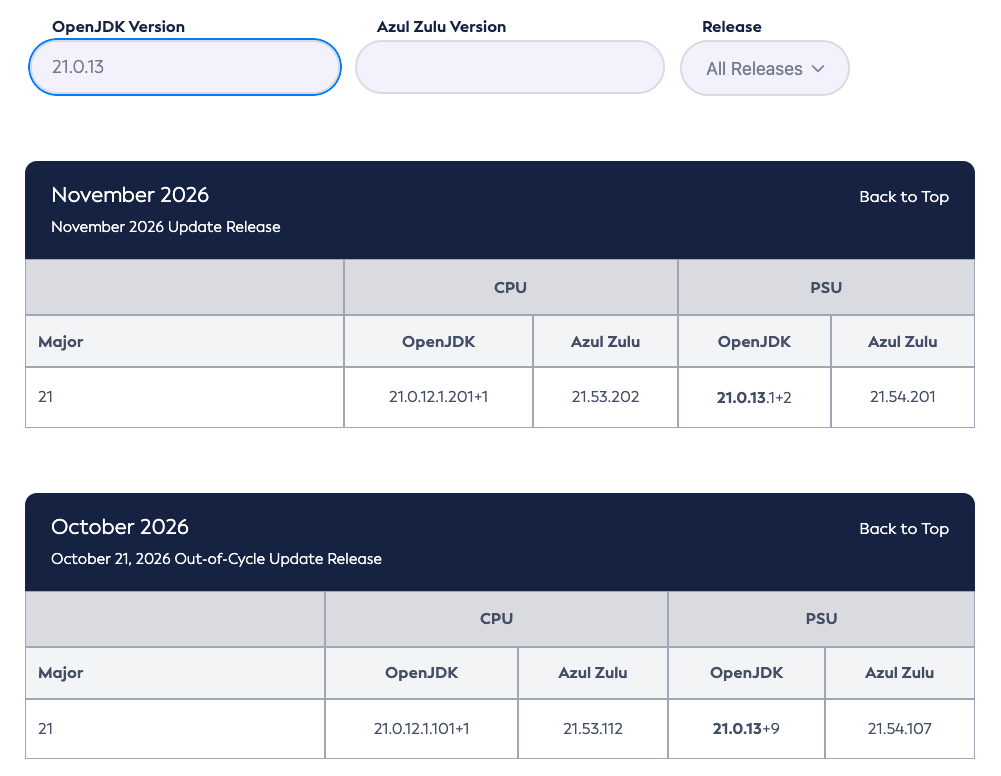
If you see 21.0.9 or 25.0.1, you run a build from October 2025. A full year of security fixes is missing. You can find back the release date in this Version Search Tool.
Compare with the latest release notes
The Azul Core release notes list every build. The table below shows the November 17, 2026 monthly update for Java 21 and 25:
| Java | PSU-based build (CA and SA) | CPU-based build (SA) |
|---|---|---|
| 21 | 21.54.201 (CA), 21.54.202 (SA) | 21.53.202 |
| 25 | 25.38.201 (CA), 25.38.202 (SA) | 25.37.202 |
CPU stands for Critical Patch Update and contains security fixes only. PSU stands for Patch Set Update and adds bug fixes and enhancements. Free Community Availability (CA) builds follow the PSU line. If you need the security-only line for production, that is part of a subscription (Subscriber Availability (SA)). The August 2026 CSPU post explains both lines in detail.
See what your build is missing
A table of the latest builds tells you where you should be. It does not tell you how far behind you are. The CVE History tool in the Azul Core docs answers that question.
Pick an LTS version (6, 7, 8, 11, 17, 21 or 25) and then the OpenJDK release you run. The tool shows three views:
- Accumulated Vulnerability Exposure: a chart that adds up the CVEs fixed in every release after yours.
- CVE Fixes per Release: a chart with the number of CVEs fixed in each release, so you see which quarters hurt most.
- CVE list per release: the individual CVEs behind the numbers.
You can also download the number of fixed CVEs per release as a CSV file, for example to add to a report for your security team.
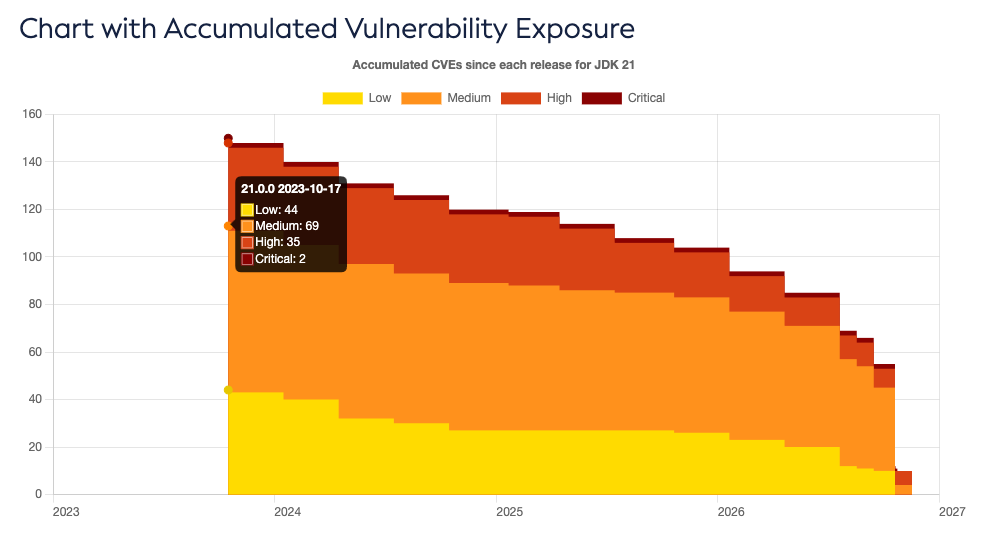
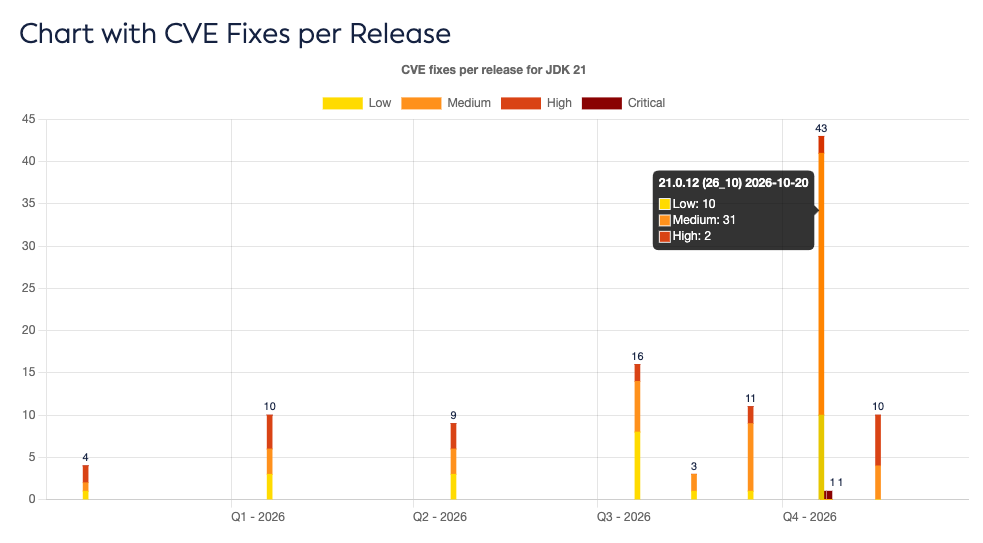
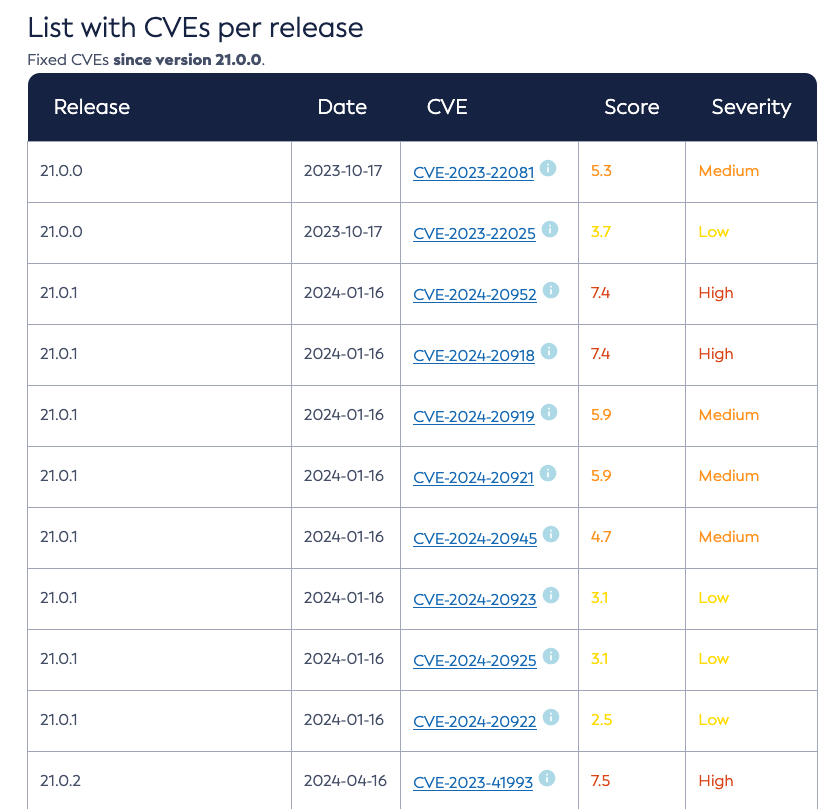
The numbers make the point. When you are running 21.0.0 (October 2023), you are exposed to 150 CVEs compared to version 21.0.13 (November 2026):
- Critical: 2
- High: 35
- Medium: 69
- Low: 44
The tool only counts CVEs fixed in OpenJDK builds. It leaves out CVEs that other distributions fixed and that are known not to affect Zulu. Figures for older releases can differ slightly from numbers other OpenJDK vendors report.
Be ready to update with the push of a button
Knowing your build is the first step. The second step is making updates easy. If replacing a JDK takes a long call and a week of coordination, you cannot react fast enough.
Docker images
Containers carry their own JDK and their own trust store. Patching the host changes nothing inside the image. Azul publishes the Docker Official Image azul-zulu, so you can use it without a namespace. Choose between two tag styles:
# Floating tag: moves with every Azul release
FROM azul-zulu:21

# Pinned tag: Zulu version, then OpenJDK version, then variant
FROM azul-zulu:21.54-21.0.13.1-jdk-debian13
Floating tags give you the newest build on every rebuild. Pinned tags give you reproducible builds, but you must bump them.
Servers and virtual machines
If you install the JDK with a package manager, the update is one command and a restart. Put it in your configuration management tool (Ansible, Puppet, Chef,…) so every server gets the same build on the same day. A JDK you installed by hand from a tarball two years ago is the one nobody remembers. Replace it with a managed package.
Inventory first
You cannot patch what you cannot find. Ask three questions about every application:
- Which JDK version and vendor does it run?
- Who owns it?
- How quickly can the team deploy a new build?
Start with a simple spreadsheet. A script that runs java -version over SSH is even better. The goal is to get your answers in minutes, not days.
Which line should you pick?
Install the CPU line quickly, after a short test, because it only contains security fixes and carries little regression risk. Test the PSU line over a longer period and move to it before the next quarterly release. That way a zero-day like the eMudhra case becomes a rebuild and a redeploy, not a regression test campaign.
Check your build today
Pick one of your Java applications right now and do two things:
- Run
java -versionand write down the exact output. - Compare it with the table in the latest Azul Core release notes.
If the numbers match, ask yourself how fast your team would have reached them after the October 24 release. If they do not match, you now know what to fix first.
I cannot tell you when the next critical vulnerability shows up. But on that day, you want to know the answer to “which build do we run?” already, instead of starting to look for it.