Testing Lottie4J JavaFX Animations in GitHub Actions Without a Display: JavaFX 26 Headless to the Rescue
When I released Lottie4J 1.1.0, I mentioned something a bit embarrassing in the release notes and this blog post: there was a new unit test to compare the JavaFX player output against a JavaScript reference player, but it “can not run on CI, because it requires a display output.” A TODO. A known limitation. One of those notes you write hoping future-you will figure it out.
JavaFX 26 was released on March 17, 2026 and includes a new headless platform, allowing me to get the test running on GitHub Actions without a display.
The Test, and Why It Mattered
The core challenge with Lottie4J is correctness. The Lottie format is complex with a lot of nested data, and my JavaFX renderer has to produce output that matches what a JavaScript player would show. Pixel-perfect is too ambitious, but “is this a close enough match” is a reasonable bar.
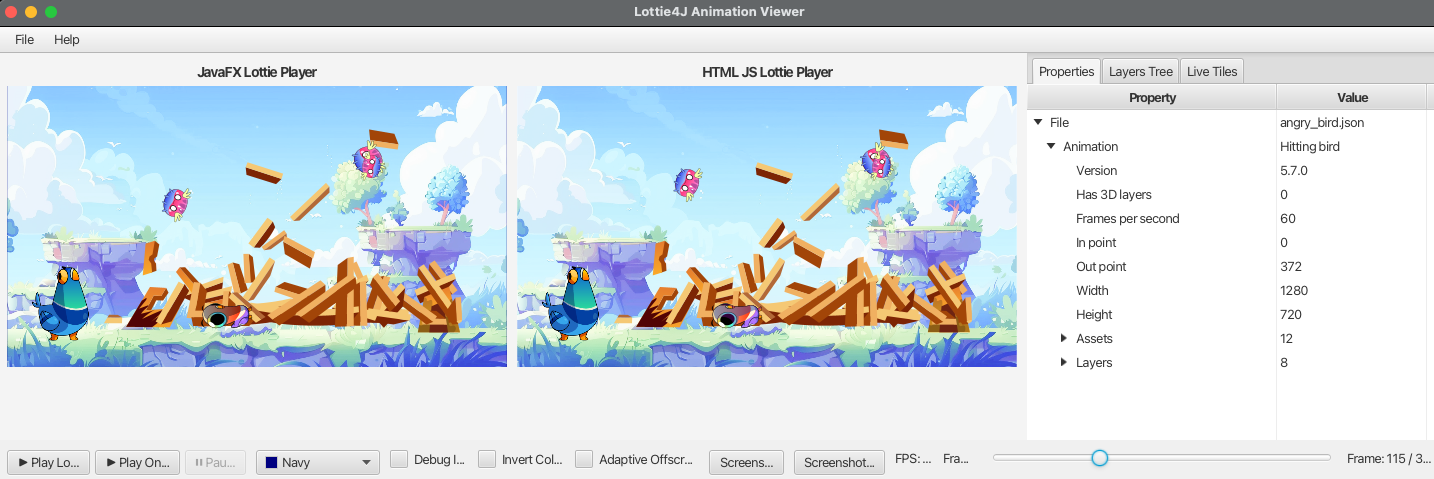
During development, I use a separate application within the Lottie4J project: LottieFileDebugViewer. This is a JavaFX application that loads a Lottie file and renders it both with the JavaFX player, and inside a Webview with the official Lottie player. This makes it easy to compare the result and debug differences by diving into the data structure and different layers.
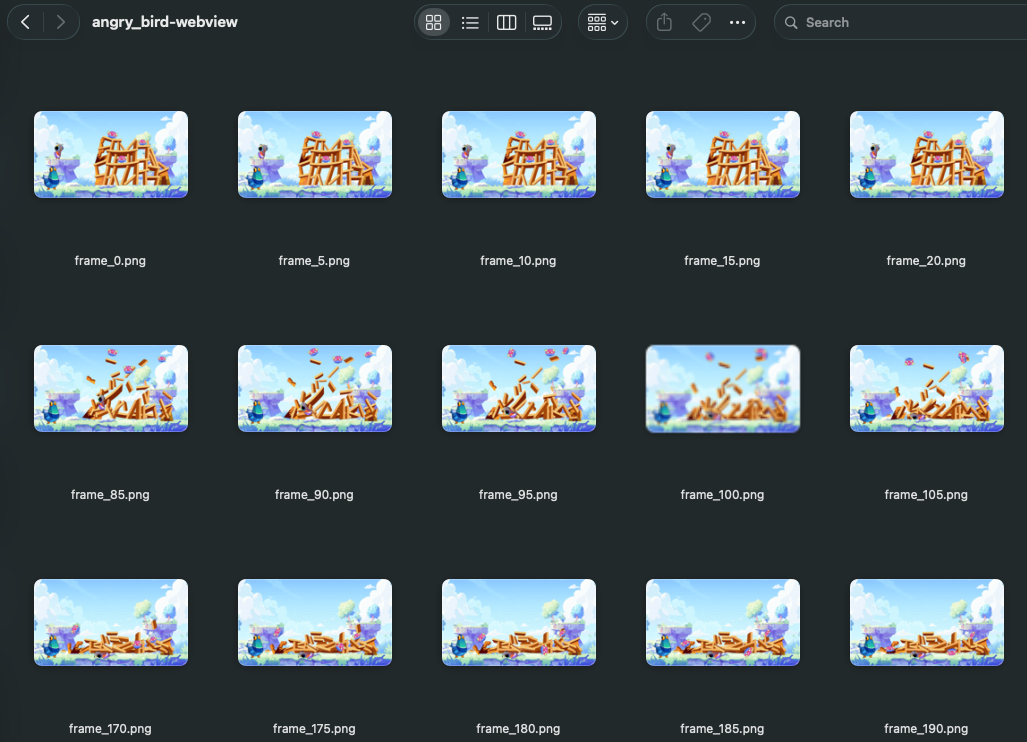
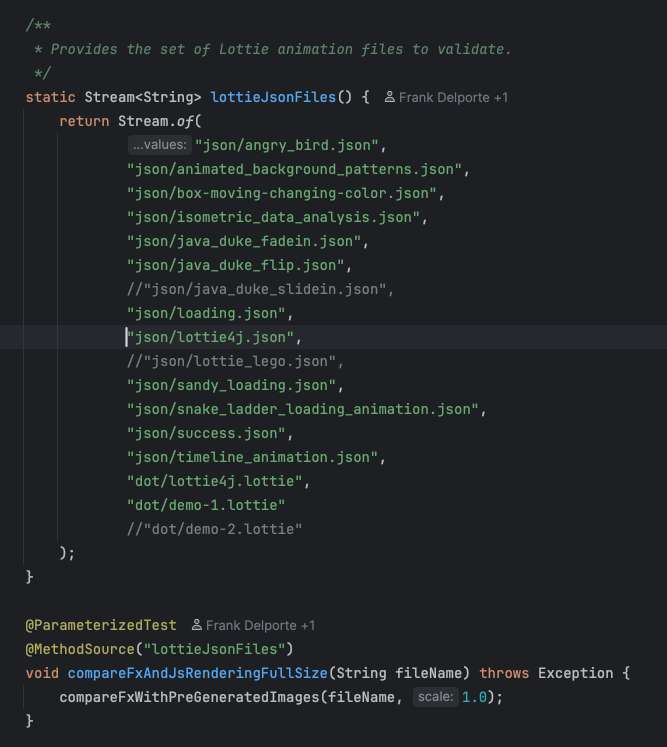
Based on this debug viewer, I created a unit-test approach with two steps:
-
A WebViewScreenshotGenerator that I run once on my developer machine. It loads each animation in a JavaFX WebView using the LottieFiles JavaScript player, and captures screenshots of specific frames. These are the reference images and are committed to the repo.
-
The unit test CompareFxViewWithWebViewTest then renders the same animations with the Lottie4J JavaFX player, takes screenshots at the same frames, and compares pixel data against the references.
The reference images are generated once and committed. The test just checks that the JavaFX output stays consistent with them. If something breaks in the renderer, the test will catch it.
This was all working fine locally. The problem was GitHub Actions. The CI runner has no display and no graphics stack. So I disabled this test for CI with:
@DisabledIfEnvironmentVariable(named = "CI", matches = "true")
What Changed in JavaFX 26
JavaFX 26 added a Headless Platform Prototype built directly into the javafx.graphics module. No extra dependencies, no native libraries, no Monocle setup. You pass a single JVM flag:
-Dglass.platform=headless
That is it. JavaFX starts up, you get a functional toolkit, you can create scenes, render nodes, take snapshots, and run animations, all without a display attached. The Gluon team did the heavy lifting on this for JavaFX 26, and it makes CI testing of JavaFX components much more practical. The flag works the same way as running your application normally. The difference is that there is nothing being drawn to a screen. For testing purposes, that is exactly what you want. It also opens the door to server-side rendering, for example, to generate a snapshot of a UI component without a display.
The Catch: JavaFX 26 Requires Java 24
Lottie4J targets Java 21 and JavaFX 21. That is the LTS version most projects are still running on. As this version is widely adopted, I don’t want to force users of the library to jump to a newer version just because I want fancier test infrastructure. So the main project stays on 21 (for now).
But JavaFX 26 requires Java 24 or higher to run. They bumped the compiled bytecode level to --release 24 in this release, so if you try to use it with an older JDK you get an error immediately. This means the test infrastructure has to use a different Java and JavaFX version than the main build. The solution I landed on was a Maven profile in the root pom.xml that overrides both version properties and configures the surefire plugin:
<profile>
    <!-- Activates JavaFX 26 headless windowing for unit tests in CI. -->
    <!-- Usage: mvn test -Pheadless-tests -->
    <id>headless-tests</id>
    <properties>
        <java.version>25</java.version>
        <javafx.version>26</javafx.version>
        <surefire.argLine.headless>
            -Dglass.platform=headless --enable-native-access=javafx.graphics
        </surefire.argLine.headless>
    </properties>
    <build>
        <plugins>
            <plugin>
                <groupId>org.apache.maven.plugins</groupId>
                <artifactId>maven-surefire-plugin</artifactId>
                <version>3.0.0-M5</version>
                <configuration>
                    <argLine>
                        --add-opens com.lottie4j.fxfileviewer/com.lottie4j.fxfileviewer=ALL-UNNAMED
                        -Dglass.platform=headless --enable-native-access=javafx.graphics
                    </argLine>
                </configuration>
            </plugin>
        </plugins>
    </build>
</profile>
When this profile is active, Maven bumps java.version to 25 and javafx.version to 26, so the dependency resolution picks up JavaFX 26 for the test classpath while the main source still compiles to Java 21 targets. The surefire plugin then passes two JVM arguments to the test JVM:
-Dglass.platform=headlesstells JavaFX to use the new headless glass backend instead of trying to connect to a display.--enable-native-access=javafx.graphicsis required because the headless platform uses native code paths that the Java module system would otherwise block.
The --add-opens line gives the test runner access to the fxfileviewer module internals it needs to load and compare the rendered output.
The fxfileviewer/pom.xml and fxplayer/pom.xml pick up the overridden javafx.version property through normal Maven inheritance, so those modules automatically get JavaFX 26 on the test classpath when the profile is active.
The GitHub Actions Side
The Maven workflow sets up the environment with a Java 25 JDK so the JavaFX 26 runtime can load, and invokes Maven with the profile:
mvn test -Pheadless-tests
The rest of the build still compiles against Java 21 targets, so the library artifact itself is not affected. The profile only kicks in for the test run. The workflow does not need any display setup, no Xvfb, no DISPLAY environment variable tweaks. The headless flag handles all of that!
What This Actually Tests
The unit test compares screenshots of Lottie animations rendered by the JavaFX player against the pre-generated reference images from the JavaScript player. It loads a set of known animation files, renders specific frames from each one, takes a snapshot using WritableImage and SnapshotParameters, and then does a pixel-level comparison with a configurable tolerance.
The result is a regression test that runs on every push. If someone changes the rendering logic in a way that visibly breaks an animation, CI will catch it. This is more useful than it sounds, because Lottie rendering involves a lot of layered transformations, easing functions, and shape operations where subtle bugs are easy to introduce.
Would I Recommend This Pattern?
Yes, with some caveats.
The version juggling is real work. If you want to use JavaFX 26 headless for testing while keeping your library on an older Java version, you need to be careful about separating the test JVM configuration from the main build. Maven makes this doable but not exactly elegant.
The reference image approach also requires discipline. The references need to be generated consistently, ideally on a reproducible setup, and you need to think about what tolerance makes sense for your comparisons. Too strict and you get flaky tests. Too loose and you miss real regressions.
But the payoff is real. The test that I had marked “can not run on CI” now runs on CI. No virtual framebuffer, no Docker tricks, no manual intervention. JavaFX starts up, renders the animations, and the comparison happens cleanly.
For any library that does visual rendering in JavaFX, this is the kind of testing infrastructure that was genuinely missing before. Good work, OpenJFX contributors!
Links: