I Benchmarked Java on Single-Board Computers: Orange Pi 5 Ultra and Raspberry Pi 5 Lead the Pack
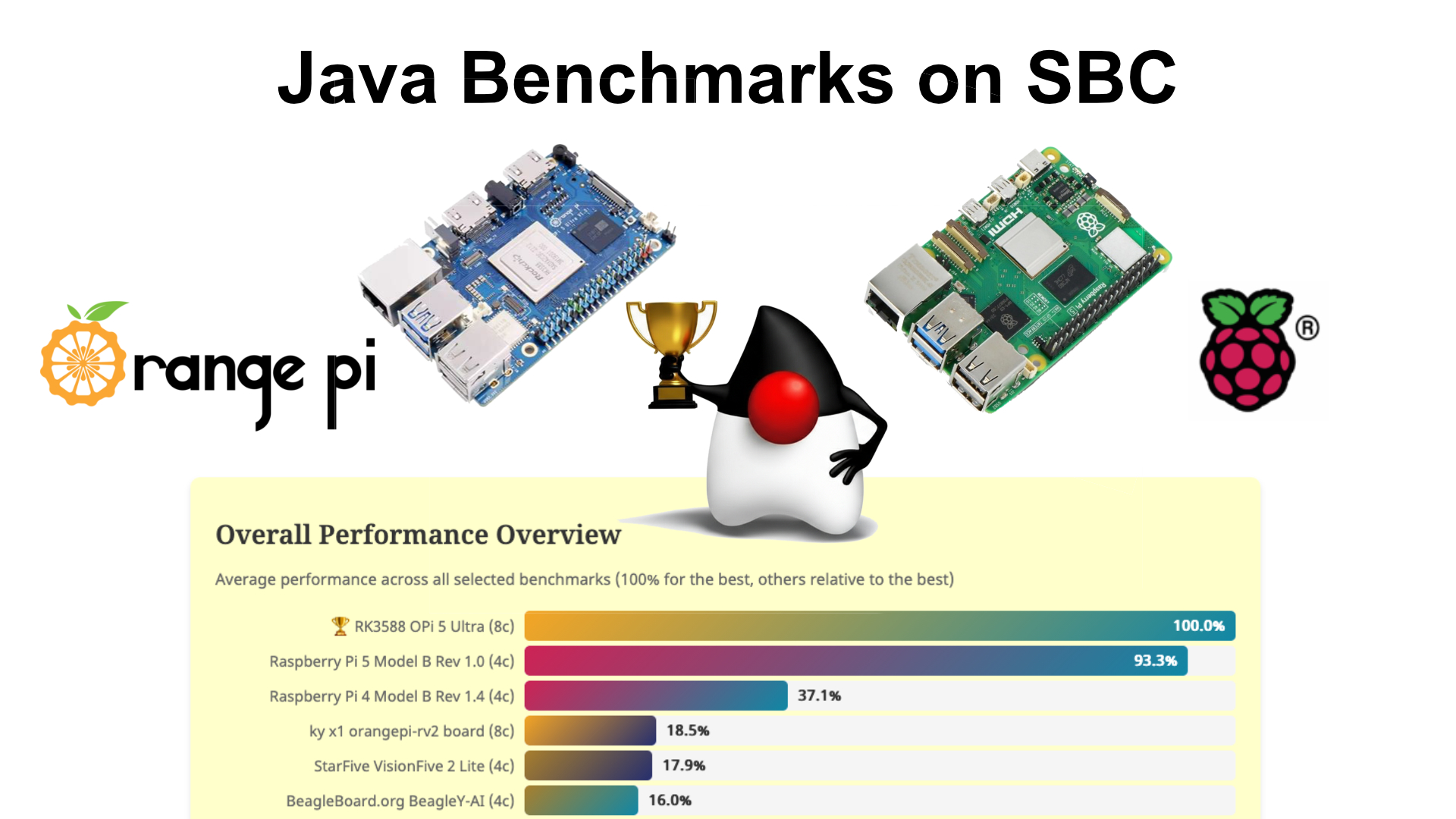
In my “Java on Single Board Computers” series, I already published several posts and videos in which I unpack the board, connect it for the first time, and try to install and run some simple Java code. In this post, I want to share some benchmarks of Java on these boards to get a better idea of the performance we can expect from Java on these platforms.
Already published in this series:
- First Experiments with Java on the LattePanda IOTA: An Alternative to Raspberry Pi?
- First Test of Java on the Orange Pi (ARM and RISC-V)
- First Test of Java on the StarFive VisionFive 2 Lite (RISC-V)
- First Test of Java on BeagleBoards (ARM and RISC-V)
- I Got Java 25 Running on the RISC-V BeagleBoard BeagleV-Fire
- Keeping Single-Board Computers Organized with a 3D Printed Stack
Benchmark Tool
To make the benchmark testing as easy as possible, I created a simple tool (written in Java of course!) that can be executed with JBang. The complete project is available on GitHub at github.com/FDelporte/sbc-java-comparison.
The project consists of two main parts: a runner and a summarizer.
BenchmarkRunner.java - The User Tool
This is the tool you run on your single-board computer. It’s a JBang script that:
- Detects system information: This uses the OSHI library to gather details about the board, CPU, memory, JVM, and operating system.
- Downloads the Renaissance benchmark suite: Automatically fetches the Renaissance Suite if it’s not already cached.
- Runs the benchmarks: Executes each benchmark three times and calculates the average score.
- Saves results locally: Creates a JSON file with all the benchmark data.
- Uploads to GitHub: Optionally, the results file can be pushed to the repository via the GitHub API for inclusion in the comparison.
You can run it directly from GitHub with a single command, after setting up your GitHub API token and the repository details (if needed):
export GITHUB_TOKEN={ghp_yourtoken}
export BENCH_GITHUB_OWNER={your_github_account}
export BENCH_GITHUB_REPO={your_fork}
export BENCH_GITHUB_BRANCH={your_branch}

jbang https://github.com/FDelporte/sbc-java-comparison/raw/main/BenchmarkRunner.java
If you want to run it without uploading results, add the --skip-push flag. And if your board has memory constraints, you can limit the heap size with --heap-limit 768m for example.
The script generates a report that looks like this:
{
  "systemInfo" : {
    "boardInfo" : {
      "model" : "RK3588 OPi 5 Ultra",
      ...
    },
    "cpuInfo" : {
      "model" : "RK3588 OPi 5 Ultra",
      "identifier" : "ARM Family 8 Model 0xd0b Stepping r2p0",
      "logicalCores" : 8,
      ...
    },
    "memoryInfo" : {
      "totalMB" : 15964,
      ...
    },
    "jvmInfo" : {
      "version" : "25.0.1",
      ...
    },
    "osInfo" : {
      "family" : "Ubuntu",
      ...
    }
  },
  "results" : [
      {
        "name" : "akka-uct",
        "score" : 17702.0,
        "unit" : "ms",
        "description" : "Actor-based concurrency. Interesting for comparing how well thread scheduling works across ARM, x86, and RISC-V kernels."
      },
    ...
  ],
  "timestamp" : "2026-02-18T10:47:46.198052372Z"
}
SummarizeReports.java - The Automation Tool
This tool runs automatically via a GitHub Action whenever a new benchmark result gets added to the repository. This tool:
- Loads all files from the
reportdirectory. - Finds the unique platforms by CPU model and keeps only the most recent result for each unique CPU.
- Generates
summary.json, a consolidated file in thedatadirectory.
This summary file is then used by the web dashboard to visualize all the results.
About The Renaissance Benchmark Suite
Rather than creating benchmarks from scratch, I chose to use the Renaissance Benchmark Suite, an open-source project designed specifically for JVM performance evaluation. Renaissance is maintained by researchers and includes a variety of real-world workloads that stress different aspects of the JVM and hardware.
The suite includes benchmarks for parallel computing, functional programming, machine learning, and more. I selected seven benchmarks that are related to the restrictions of single-board computers. I also found out that the scrabble benchmark can’t run with Java 25, so it’s not included.
- akka-uct: Actor-based concurrency, tests thread scheduling across different architectures.
- fj-kmeans: Fork/join parallelism with K-Means clustering, stresses CPU and multi-core utilization.
- scala-kmeans: Single-threaded K-Means in Scala, provides a single-core performance baseline.
- future-genetic: Genetic algorithm using futures, exercises the thread pool and garbage collector.
- mnemonics: Serial JDK Streams, baseline for stream processing.
- par-mnemonics: Parallel JDK Streams, reveals how well different architectures handle parallelism.
- db-shootout: In-memory databases, tests memory bandwidth and subsystem performance.
I specifically avoided the Apache Spark benchmarks from Renaissance, as they’re very memory-hungry and designed for multicore server machines. They would either crash with OutOfMemoryErrors or take forever on these constrained boards.
The Results
Based on the automatically generated summary.json and other configuration files in the repository’s data directory, I created (with a lot of help of Claude.ai…) an interactive dashboard to visualize all the results. You can explore it yourself at webtechie.be/sbc/.
Important note: I ran the tests on the default Ubuntu system provided by the manufacturer of the board, after doing an update/upgrade and installation of OpenJDK 25 and JBang. The runner itself also uses some resources of the board, so this influences the numbers, but the same approach has been used on all boards to have a similar comparison.
The Dashboard
The “Vanilla JavaScript” (= no libraries, just HTML/CSS/JS) dashboard presents the benchmark results in an easy-to-understand format. For each board, you can see:
- System information: Board model, CPU details, memory, Java version, and operating system.
- Individual benchmark scores for each of the seven tests.
- Visual comparisons across all tested boards.
The dashboard pulls the latest summary and other data files from the repository, so it’s a living comparison that grows as more test reports become available.
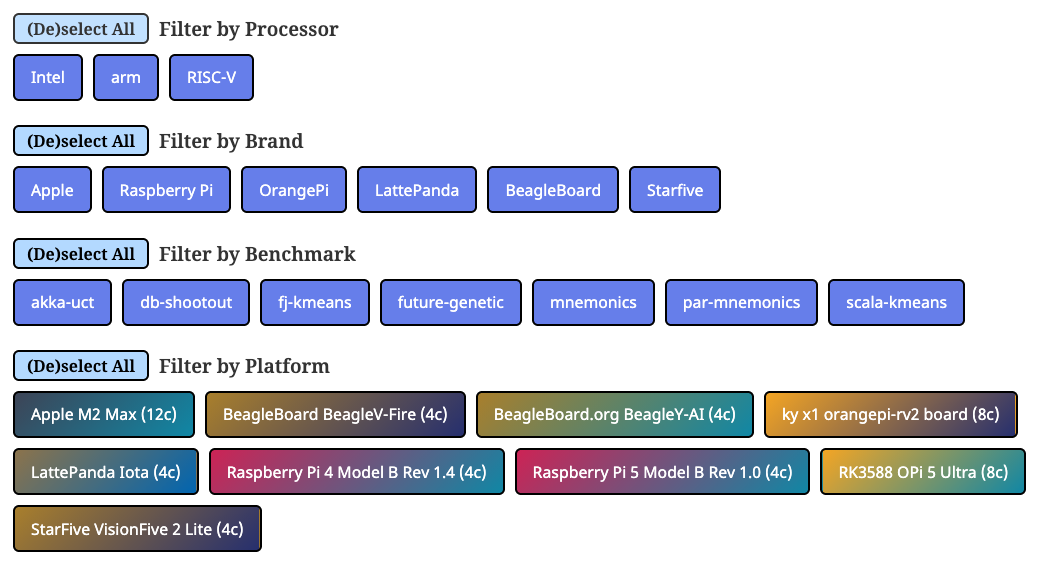
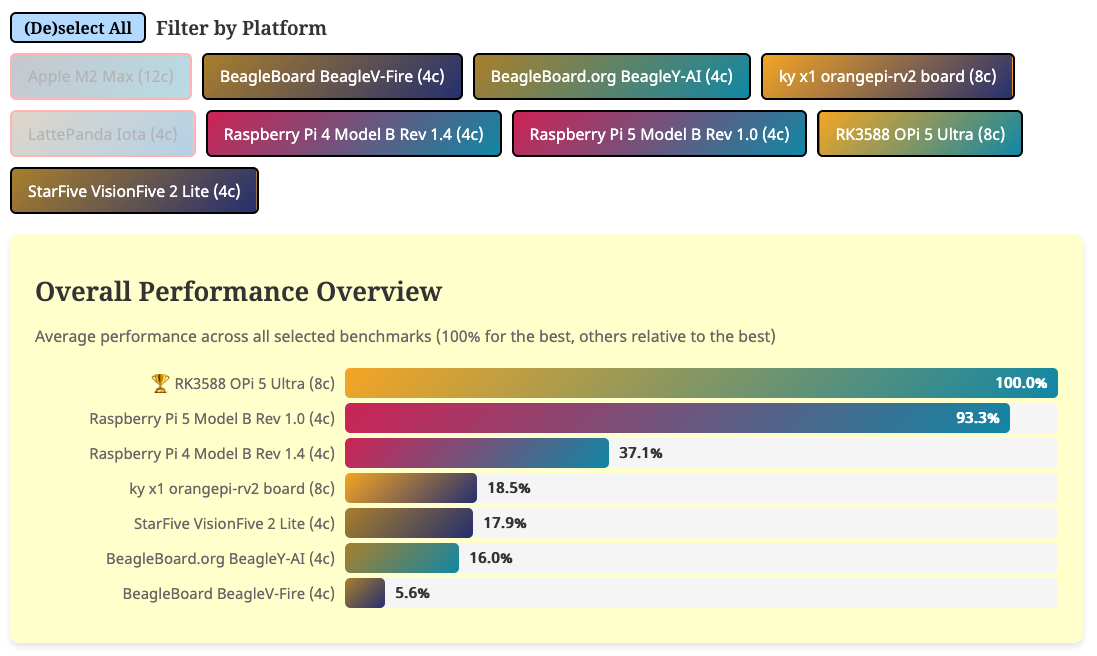
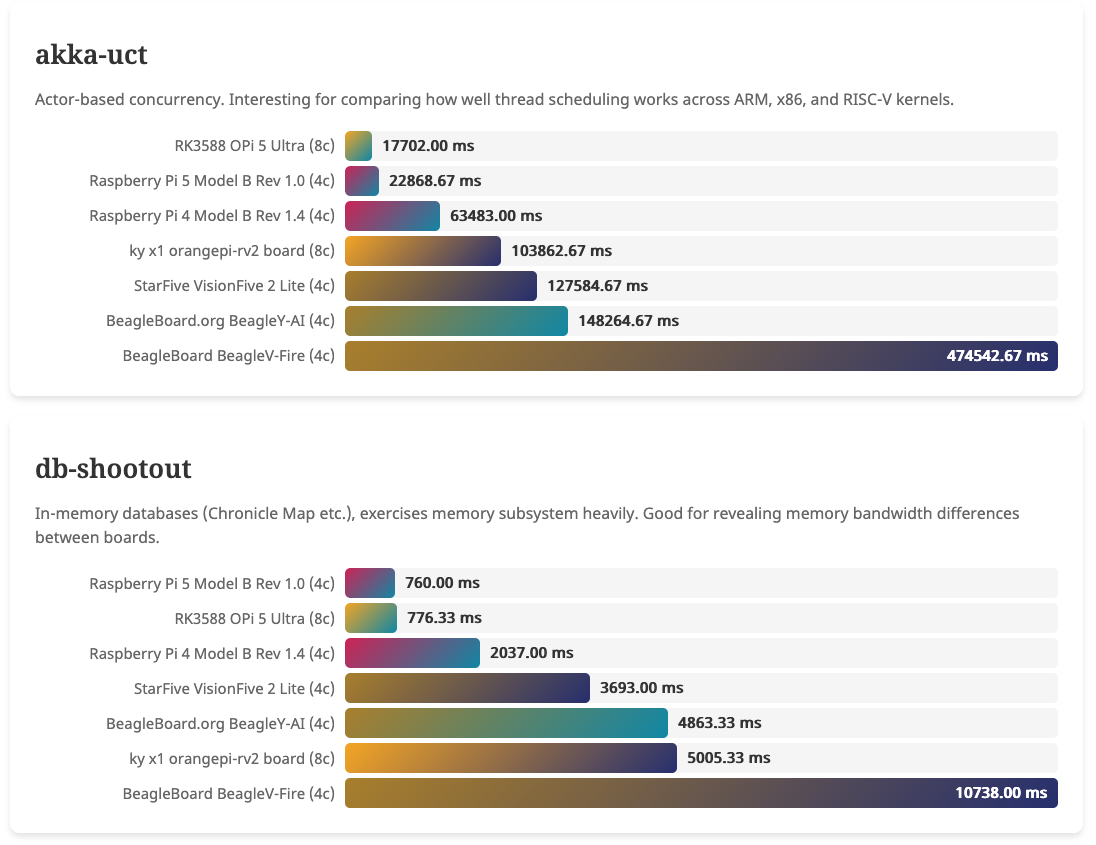
These are screenshots from a first test round, check the actual last status at webtechie.be/sbc/.
Analyzing the Results
Some general remarks about the charts:
- The overview chart at the top gives the best board (based on your selection) a score of 100% (best), and the other boards are compared to it.
- For the other charts, per benchmark, the lower scores are better. All benchmarks measure execution time in milliseconds, so lower numbers indicate faster performance.
- Because of the limited amount of memory on the BeagleV-Fire, the benchmarks were executed with
--heap-limit 768mon this board to avoid JVM crashes. This is also a factor leading to the lower scores for this board.
Performance Leaders
Not surprisingly, my Apple M2 workstation dominates the charts with the fastest scores across all benchmarks. This is expected, it’s a high-end desktop processor with 12 cores and significantly more power budget than any single-board computer. The LattePanda IOTA with its Intel N150 x86 processor also performs exceptionally well, coming in second place on most tests.
The LattePanda IOTA deserves special attention here. While I initially excluded it from the “true” single-board computer competition, the pricing actually deserves reconsideration. At 110€, it’s comparable to a Raspberry Pi 5 with additional M.2 expansion. The IOTA comes pre-equipped with an M.2 slot for NVMe storage expansion, full-size HDMI, three USB ports, and GPIO headers, all integrated into one board. However, it does require active cooling (the “do not operate without a heatsink” warning is serious), has a slightly larger form factor than traditional Raspberry Pi boards, and demands more power. It’s still more of a compact x86 PC than a Raspberry Pi competitor, but for users who specifically need x86 compatibility (running existing x86 applications, Windows support if needed, or specific libraries), it offers exceptional performance for the price.
For traditional single-board computer use cases like IoT, robotics, GPIO-heavy projects, etc. the ARM-based boards remain the better choice. Definitely the GPIO headers have an advantage on the Raspberry Pi, Orange Pi, and similar boards. I tried the GPIOs on the LattePanda IOTA, and found out that they are exposed by a RP2040 co-processor which connects to the Intel CPU via USB. A strange approach which will be hard to use with the Pi4J library.
The Real Single-Board Computer Competition
Among the boards that fit the traditional SBC form factor (Raspberry Pi-sized, passive or small fan cooling, under $200), the results tell a more nuanced story:
- Orange Pi 5 Ultra (ARM RK3588, 8 cores) shows the best results in most of the tests, particularly on multithreaded workloads.
- Raspberry Pi 5 (ARM Cortex-A76, 4 cores @ 2.4GHz) delivers solid, consistent performance across all benchmarks, very close to the Orange Pi 5 Ultra.
- Raspberry Pi 4 (ARM Cortex-A72, 4 cores @ 1.8GHz) still performs admirably despite being an older generation.
- All others show significantly lower performance, which is expected given their lower core counts and less powerful CPUs.
RISC-V Performance
The RISC-V boards present an interesting case. The Orange Pi RV2, BeagleV-Fire, and StarFive VisionFive 2 Lite show that RISC-V is absolutely viable for running Java applications, though performance still lags behind ARM equivalents. This is expected given that RISC-V is a newer architecture with less mature tooling and optimization.
Selecting a Winner
If I had to pick a winner from the “true” single-board computers (excluding my Apple workstation and the LattePanda IOTA), the OrangePi 5 Ultra comes out on top, but the Raspberry Pi 5 is a very close second. These boards offer the best combination of performance and price. Raspberry Pi has the added advantage of a big ecosystem support, and ease of use with the Imager Tool. Orange Pi can still learn a lot from the extensive documentation, and huge library of compatible accessories and software that is available for Raspberry Pi.
Conclusion
I wanted to run benchmarks on multiple boards but needed a solution to do this as quickly and easily as possible. After all, this is a pet project for me. I got the boards for free, but comparing them is a personal challenge in my “free” time… With the current setup with the two scripts, I found a solution which is fast to execute. I only need access from my work PC, copy the GitHub token and JBang command, and let the test run in the background. The GitHub Action then automatically pushes the results to the repository and updates the dashboard. So, goal achieved! :-)
The results confirm: Java runs without problems on all these platforms, from ARM to x86 to RISC-V! Of course, there are performance differences between architectures and specific boards, but every single one of the tested devices can run real-world Java applications with a good performance.
Try It Yourself!
I encourage you to run the benchmark on your own boards and contribute the results! The process is simple:
# Make sure you have Java 25 and JBang installed
jbang https://github.com/FDelporte/sbc-java-comparison/raw/main/BenchmarkRunner.java  --skip-push
If you want your results added to the public dashboard, follow the instructions in the repository README to set up GitHub API access and submit your results.
What’s Next?
This is just the beginning! I also received two Banana Pi boards I still need to unpack and test. And it would also be great to add a benchmark for JavaFX performance, but that will exclude RISC-V as there is no JavaFX port for it (yet?). And, of course, I really want to get started with exploring Pi4J on all these boards and see how it compares to the GPIO use of the Raspberry Pi.
If you have suggestions for additional benchmarks or want to see specific boards tested, let me know in the comments or reach out on Mastodon, Bluesky, or my YouTube community!